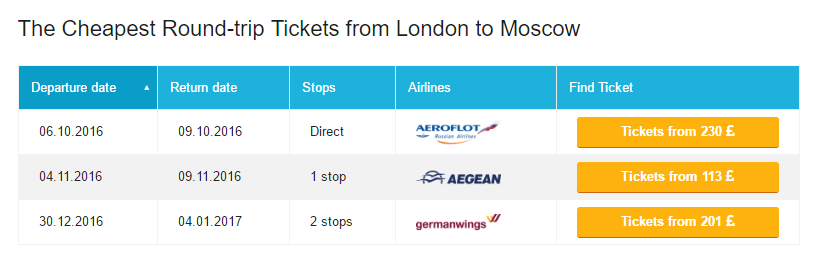
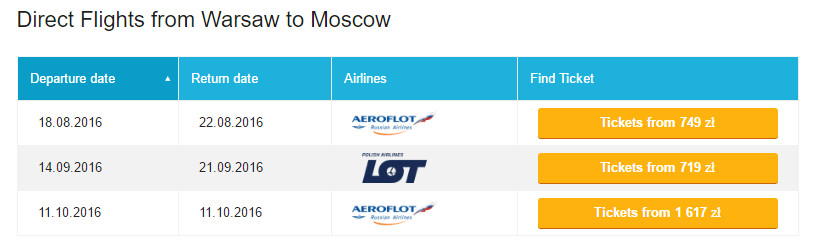
You can simply add the search form to your website’s sidebar or download the plugin and take advantage of its advanced functionality. We always encourage our partners to use the tools inside the articles. Let’s say you wrote an article about how to travel to Mexico, so why not to add a flight search form and “best deals” section in it? Thereafter, you will gradually bring your reader to make a purchase.
Our plugin features handy tables with cheapest flights to the selected direction for the coming dates, current month, direct flights, etc. One of the pros of these tables is the flight price displayed right on your website, so you won’t have to additionally search and open a bunch of tabs to find out the flight cost.
How to install the Travelpayouts plugin?
Plugin installation and configuration will take you no more than 5 minutes:
Activate the plugin after it gets installed so that you could track the clicks and purchases for your referral link. To do that, specify your personal marker and token, which can be found in “Developers – API” section of your Personal Account.
Now you only have to select tools that will be used on your website: search forms, widgets or tables.
What currencies are now supported by the plugin?
US Dollar USD
Euro EUR
Brazilian Real BRL
Canadian Dollar CAD
Swiss Franc CHF
Hong Kong Dollar HKD
Indonesian Rupiah IDR
Indian Rupee INR
New Zealand Dollar NZD
Filipino Peso PHP
Polish Zloty PLN
Russian ruble RUB
Singapore Dollar SGD
Thai Baht THB
British Pound GBP
South African Rand ZAR
Ukrainian Hryvnia UAH
Now, all these currencies are supported in the tables.