
To run a successful affiliate marketing website, you need to learn how to drive high-quality traffic. While using search engines is often the most reliable approach, it takes time to build a steady flow of visitors. “Can you use Google Ads for affiliate marketing?” is what many marketers wonder when they want to drive traffic much faster.
Can you use Google Ads for affiliate marketing?
Google Ads policies do not forbid traffic to affiliate marketing campaigns. You must, however, follow your advertiser and affiliate network terms, which may ban paid traffic, especially for brand names, websites, and keywords. Try Google Ads to see if it brings results, as it does for many marketers.
The key to successful marketing with Google Ads is finding the right approach. You cannot create direct ads to your advertiser’s website, but there are other ways to drive traffic and generate clicks. For example, use affiliate links to promote your website instead of promoting your brand directly.
Google Ads affiliate marketing policies you need to know
In addition to reviewing your affiliate program’s rules, read the Google Ads policies. Often, small details matter, so check them in advance to avoid account suspension.
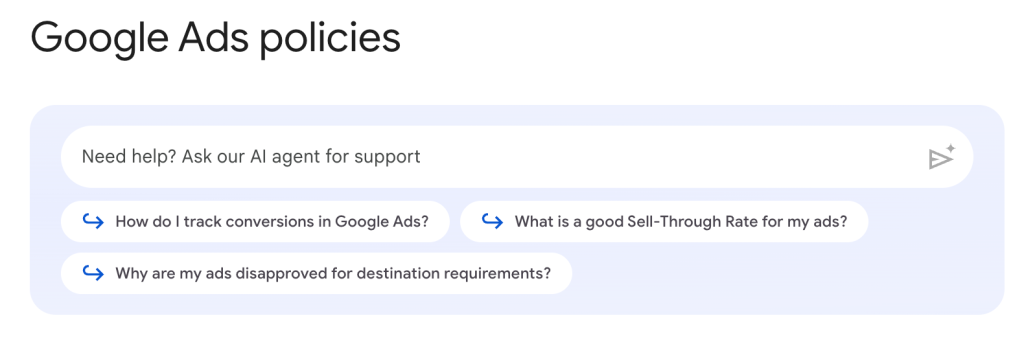
For example, Google requires you to disclose your partnerships, since you don’t produce the products and services yourself.
Google also explicitly tells webmasters to follow the rules of their affiliate program when running ads on the platform.
Failure to comply with this policy will not result in your account being suspended immediately, but you will receive a warning.
Direct linking and bridge pages
Google aims to provide a relevant experience by enforcing strict requirements for your ad destinations. If you want to keep your campaigns running, you should focus on two main concepts that often affect partners.
Bridge pages are gateway sites designed solely to send users elsewhere. If your landing page serves only as a simple pass-through, offering no unique value or original content, Google may flag it for violating the “Abusing the Ad Network” policy. To stay safe, your affiliate landing page must function as a stand-alone resource that helps travelers make decisions.
Regarding direct linking, Google Ads usually avoids showing multiple ads that lead to the same destination for a single search query. This ensures a varied user experience for travelers. If several ads point to the same brand, Google typically displays only the one with the highest Ad Rank. To ensure your ads actually appear, creating your own high-quality content is a much more reliable strategy than simple direct linking.
Thin content and low-value landing pages
Key takeaways: make your page a user destination by sharing original travel insights that aren’t available on the brand’s official site. Avoid thin content and scraped data; Google values unique value and useful features.
You should also keep your ad density low to avoid being flagged for arbitrage. If your ad gets disapproved, simply add more substance to your page or appeal the decision directly in your account. Following these Google Ads policies ensures your campaigns stay active and profitable.
Trademark bidding and branded keywords
One of the most important rules most advertisers establish in their affiliate programs is not to bid on brand names or keywords.
For instance, if you want to promote Trip.com with Google Ads, you shouldn’t use the name “Trip.com” anywhere in your ad, including in the title, description, or even URL.
Failure to comply with this rule might not only get you banned from Google Ads but also from your advertiser, resulting in the voiding of commissions. It is really not worth the risk!
Affiliate disclosures and misleading claims
When creating content to promote your links, it is natural to highlight the offer’s advantages. However, you need to be realistic and avoid any unreasonable superlatives both on your website and in your ads. Basically, you should avoid lying to customers, which can result in account suspension, loss of audience trust, and canceled commissions. No brand appreciates a high refund rate, so be sure not to mislead users.
Checking affiliate program traffic rules
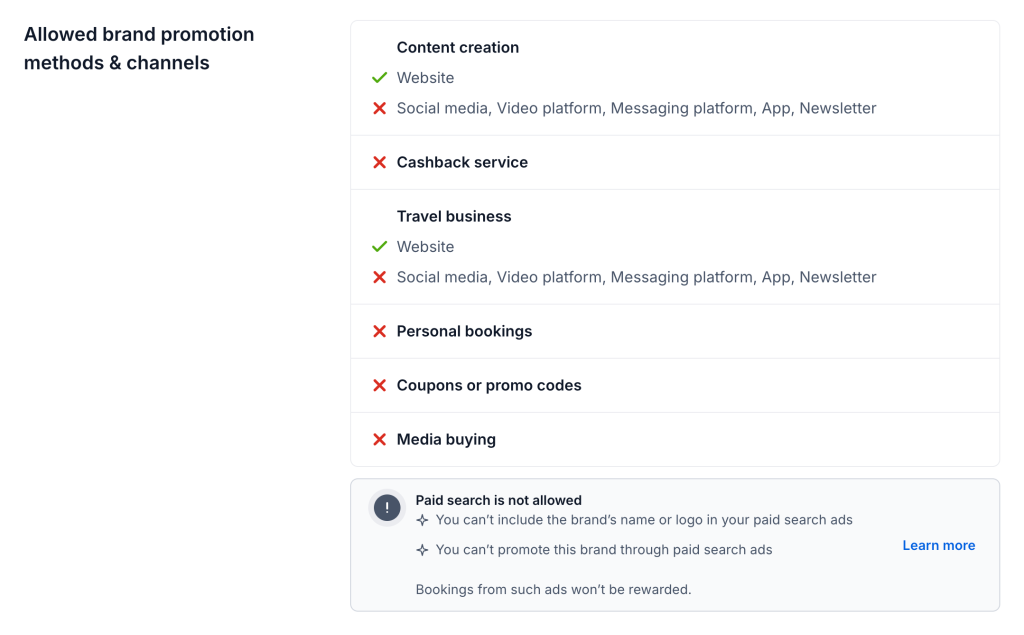
Not every affiliate program allows paid traffic from Google Ads. Some advertisers prohibit search ads completely, while others restrict bidding on branded terms or direct linking.
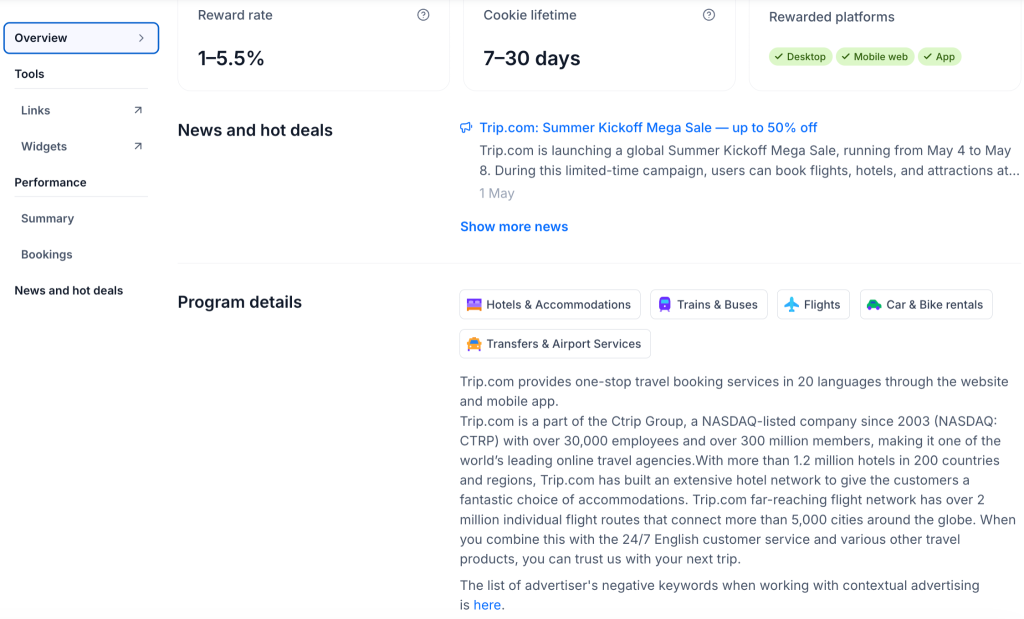
Before launching campaigns, carefully review the traffic rules inside your affiliate dashboard. On Travelpayouts, you can find this information in the “Overview” section of each partner program. Checking these rules in advance helps you avoid rejected rewards and unnecessary account issues.
How to use Google Ads for affiliate marketing: step-by-step
In this section, we will walk you through a step-by-step process for handling affiliate marketing with Google Ads.
Step 1: Choose the right affiliate program
Trust is key to growing a successful affiliate venture. So, you want to establish good relationships with your audience and recommend only high-quality products. The brand you work with can be a global brand or a local service provider, as long as it is relevant to users. To do this, it is important to analyze your audience and choose reliable brands to promote.
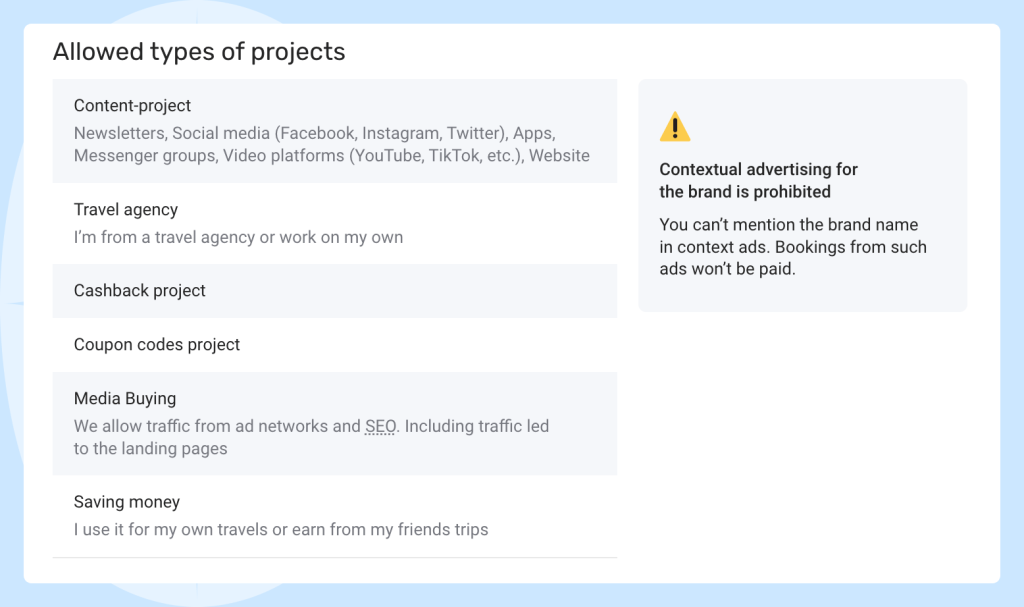
Travelpayouts offers over 50 partner programs from reliable travel partners, so you don’t need to manually check each offer before joining. Some brands accept contextual advertising, while others do not. You can check the allowed traffic types in the “About” tab on each program page.
Step 2: Build a compliant landing page
However, not every page or website guarantees success. To comply with Google Ads policies and improve campaign performance, your affiliate landing page should contain original, valuable content that helps users solve real problems. Google’s algorithms prioritize informative, trustworthy pages, so thin or duplicate content is unlikely to perform well.
Before launching a Google Ads campaign, build an authoritative website that attracts visitors organically. Prepare unique content that lets you place affiliate links naturally and supports your affiliate funnel. Also, include your contact details and company information to build user trust and comply with Google Ads requirements.
An established website can also help you generate organic traffic, improve your quality score, increase your conversion rate, and reduce your cost per click. Proper conversion tracking setup is equally important if you want to optimize paid traffic affiliate marketing campaigns and build a high converting landing page that follows the google ads affiliate marketing policy.
Step 3: Set up your Google Ads campaign
Choose your campaign type and define a primary goal. Then, configure the basic settings, including the campaign name, networks, location, language, target audience, budget, and bidding strategy.
Next, create ad groups to organize your ads and targeting. You can further refine your reach using keywords, topics, and placements. One of the final steps is uploading your ad creatives, although you can also add them later.
Once everything is configured, your Google Ads campaign setup is complete.
Step 4: Write ads that match search intent
When promoting your links, highlight the advantages honestly. Avoid unrealistic superlatives on your site and in ads. Misleading customers can lead to suspended accounts, lost trust, and canceled commissions. No brand wants a high refund rate, so don’t mislead users.
Step 5: Launch with a controlled budget
Cost per click varies significantly depending on your niche, advertising platform, geolocation, and audience targeting. Use Google Ads Keyword Planner to estimate keyword costs before launching ads.
With Google Ads, you can set up your daily and monthly advertising budget, as well as overall bid price and campaign budget. No minimum deposit is required, so you can start your advertising campaign without making any major investments.
Step 6: Track and improve
Tracking click counts and other metrics is beneficial for any affiliate marketing campaign, especially when you are paying for traffic.
First and foremost, avoid redirects or cloaked links to avoid account suspension in Google Ads. However, you can track your campaigns using Google UTM tags in addition to the affiliate program’s internal scripts.
Now, let’s see which metrics you can track to measure the success of your campaign:
- Clicks. The more clicks, the more exposure your ad will generate. However, without an increase in sales, your audience will not be interested in the product you promote, or your landing page will not correlate to the advertisement.
- Return on ad spend. This metric will help you assess the campaign if you are on a budget. You can calculate return on ad spend by dividing affiliate revenue by total ad spend.
Best practices for affiliate marketing with Google Ads
Mastering the balance between platform compliance and profit is the key to long-term success in paid search. Use these proven best practices to maximize the performance of your campaigns.
Focus on value before the click
A successful affiliate landing page should help users before asking them to click on an offer. Instead of pushing promotions immediately, focus on solving problems, answering questions, or comparing options.
This approach improves user trust and often leads to higher conversion rates because visitors already understand the value of the offer before reaching the advertiser’s website.
Optimize for conversion quality, not just volume
High traffic numbers do not always translate into affiliate revenue. Instead of focusing solely on clicks, pay attention to the quality of your traffic and how users behave once they reach your landing page.
A smaller audience with strong purchase intent will usually perform better than large volumes of untargeted traffic. Continuous optimization helps improve both conversion quality and long-term profitability.
Test landing pages and ad copy
Even small changes in headlines, visuals, or calls to action can significantly affect campaign performance. Test different versions of your ads and landing pages to understand which combinations generate the best results.
A/B testing also helps improve your conversion rate over time while lowering acquisition costs.
Use relevant keywords
Make sure your ad properly displays the affiliate offer that you are promoting. Otherwise, your visitors will quickly realize that your webpage does not correspond to the advertisement, resulting in a high bounce rate.
Don’t bid on brand keywords
Many affiliate programs prohibit bidding on branded keywords, including company names, misspellings, or trademarked product terms. Violating these rules can result in the loss of commissions or removal from the affiliate program.
Avoid any misguided claims
Misleading statements may temporarily increase clicks, but they usually damage trust and campaign performance over time. Use clear, accurate messaging that sets realistic expectations for users and reflects the true value of the offer.
Common mistakes affiliates make with Google Ads
- Sending paid traffic to low-value pages.
Pages with thin or duplicated content rarely perform well in Google Ads. Your landing page should provide useful information before asking users to click on an affiliate offer.
- Ignoring platform policies.
Violating Google Ads policies can lead to ad disapprovals. Always review both Google Ads rules and affiliate program restrictions before launching campaigns.
- Using misleading claims.
Exaggerated promises may attract clicks, but they usually reduce trust and increase refund rates. Clear and accurate messaging performs better in the long run.
- Hiding destination URL.
Google discourages cloaked or misleading URLs because they create a poor user experience. Transparent links help improve trust and maintain account compliance.
- Skipping proper tracking setup.
Without tracking, it becomes difficult to understand which campaigns generate revenue. Use UTM tags and affiliate tracking tools to measure real performance.
- Scaling campaigns too early.
Increasing budgets too quickly can waste money before campaigns are properly optimized. Test and improve performance gradually before scaling.
How to track performance
Tracking helps you understand which campaigns actually generate revenue and which ones waste the budget. When you have clear data, you can stop guessing and start making moves that actually grow money.
UTM tags
UTM tags are like digital fingerprints for your traffic. They are simple bits of code that you attach to your links so you can see the secret journey a visitor took before landing on your page. They don’t change where the link goes, but they give you all the behind-the-scenes details.
When setting up your Google Ads campaign, make sure to use these tags each time. If you want to see these details right inside your reports on Travelpayouts, use SubID. This simple step connects your paid traffic data with your actual earnings, so you always know your true return on investment.
Google Ads metrics
Your dashboard will soon buzz with all kinds of data, and it is easy to get lost in the noise. To stay on track, focus on these key indicators that show exactly how your ads are performing in the real world.
Click-Through Rate (CTR). This is the first big test for your creative work. Your CTR tells you whether your message is actually catching a traveler’s eye. If the number is low, your ad might be a bit dull, or you might be showing up for the wrong search terms. A healthy CTR means your audience is interested and ready to see what you have to offer on your affiliate landing page.
Quality Score. Think of this as Google giving you a grade from one to ten based on how helpful you are. The platform evaluates your ad, keywords, and landing page to determine whether they work together. A high score is your secret weapon because it makes your ads cheaper and helps you win better positions.
Cost Per Click (CPC). Every click has a price tag, and you need to manage it wisely. Your goal is to find the sweet spot where you bid enough to stay in the game without letting the costs eat up your potential commissions. Successful partners are always looking for ways to lower their CPC while maintaining high-quality traffic.
Impressions. This metric shows you how many times your ad actually appeared on a traveler’s screen. While clicks are what eventually lead to money, impressions tell you a lot about your reach and visibility. It is the very first step in your affiliate marketing funnel, showing you exactly how much of the market you are capturing.
Affiliate-side metrics
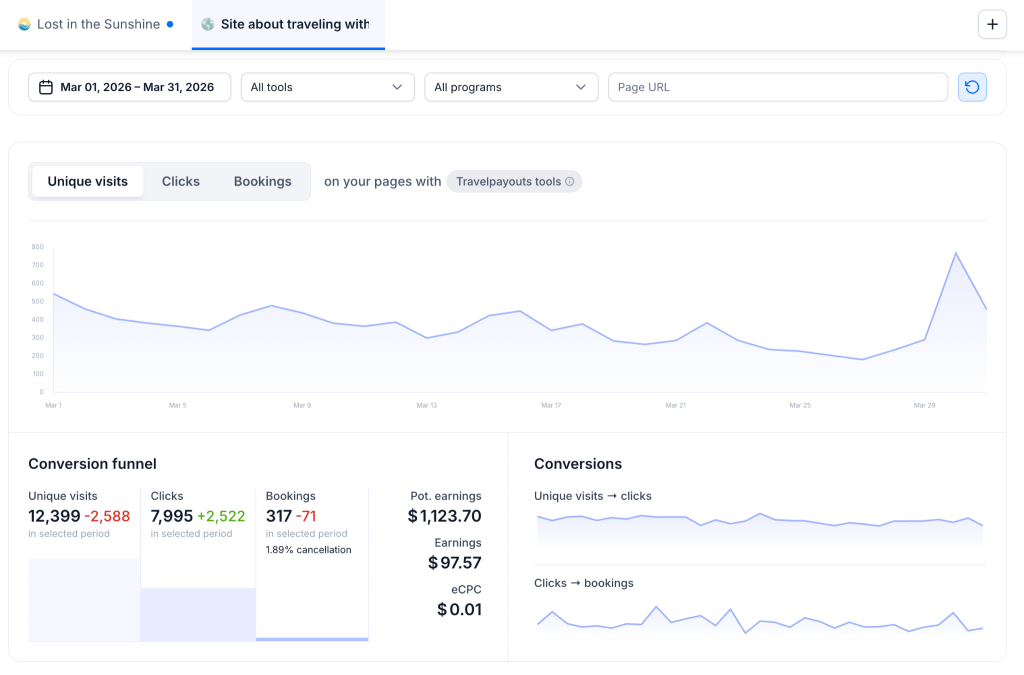
To get the full picture of your performance, you should always combine Google Ads analytics with data from your Travelpayouts dashboard. This is where you track the actual money landing in your pocket after all your hard work. While Google shows you how people interact with your ads, Travelpayouts reveals the real financial impact of those clicks.
The “Earnings” section shows the total money you have made using various affiliate tools. This number gives you a clear snapshot of your success across all partner programs for whatever time period you choose to analyze.
Section “Top performing programs” highlights the travel brands that are bringing you the most success. While your date filter updates the specific numbers you see, the program order remains based on your earnings over the last 60 days.
The “Conversion” section automatically tracks how effectively your partner programs are performing. At a single glance, you can see the total number of clicks and bookings, which the system then uses to calculate your overall conversion percentage. This is one of the most vital areas of your dashboard because it shows exactly how well your Google Ads for affiliate marketing are paying off. When you see these numbers growing, you know your content and your ads are working in harmony to drive results.
FAQ about Google Ads and affiliate marketing
Is Google Ads worth it for affiliate marketing?
Yes. Google accounts for around 90% of search traffic, so it is often the first platform people go to when looking for a product or service.
Can you direct a link from Google Ads to an affiliate offer?
Google prefers pages that provide original value instead of simply redirecting users to another website. That is why many affiliates use their own landing pages with useful content, comparisons, or recommendations before sending visitors to an advertiser.
Do you need a landing page for affiliate marketing with Google Ads?
Using a dedicated landing page is strongly recommended if you want stable long-term results and better Google Ads compliance.
A high-quality landing page helps build trust, increase conversion rates, and provide users with enough information before they click an affiliate offer.
What is the safest Google Ads strategy for affiliates?
The safest approach is to start with a small daily budget, test different creatives and audiences, and focus on continuous optimization before scaling campaigns that generate stable results.
Final thoughts about Google Ads for affiliate marketing
If you are looking to boost your traffic and get clicks on affiliate links, running a Google Ads campaign can be a great solution. It is one of the most popular promotion platforms with strong targeting features and huge traffic volumes. It is absolutely possible to get a positive ROI when promoting your affiliate offer with Google Ads if you carefully follow the platform’s policies as well as the rules of your affiliate program. Create an ad that captures your potential customers, and include a link to avoid being suspended from the network.