

What Is Google Search Console?
Google Search Console is a special webmaster tool for collecting website performance and visit rate data. Its last update was in January 2018. The console has a user-friendly interface and accessible panels with graphs conveniently representing analyzed website statistics. This is a great solution for SEO experts as well as those wishing to single-handedly promote their resources in the Google search results. We will tell you how to use Google Search Console to your advantage by highlighting several lifehacks that will help you get the most out of it.Leverage Rich Cards to Your Advantage
Rich Cards is a Google Search Console section that helps create visually attractive user content. It is a new option for search appearance. It employs rich fragments and a special type of markup – schema.org. Web resources designed using it are decent competition for websites that don’t involve rich cards. You can make your meta data include not only a title and description but also an image.Find Ideas for a Blog After a Current Content Analysis on the Search Page
The Search page is another very useful section in Google Search Console. It’ll help you learn more about how your site appears in search results. Based on the analysis, you can put effort into enhancing the resource’s SERP ratings. This section also indicates in which requests your resource appears in the SERP. You can learn which requests are the most popular, which third-party resources have links to your website, and whether your site is accessible from mobile browsers.Tool for Page Indexation
The ‘Index Status’ section can help you define which page URLs related to your website were indexed by Google and blocked by search bots. In fact, there are a couple of tips for increasing your page ranging and preventing them from being indexed by Google. To learn the exact number of indexed pages, take a look at the following graph. The exact number is situated in the upper left corner.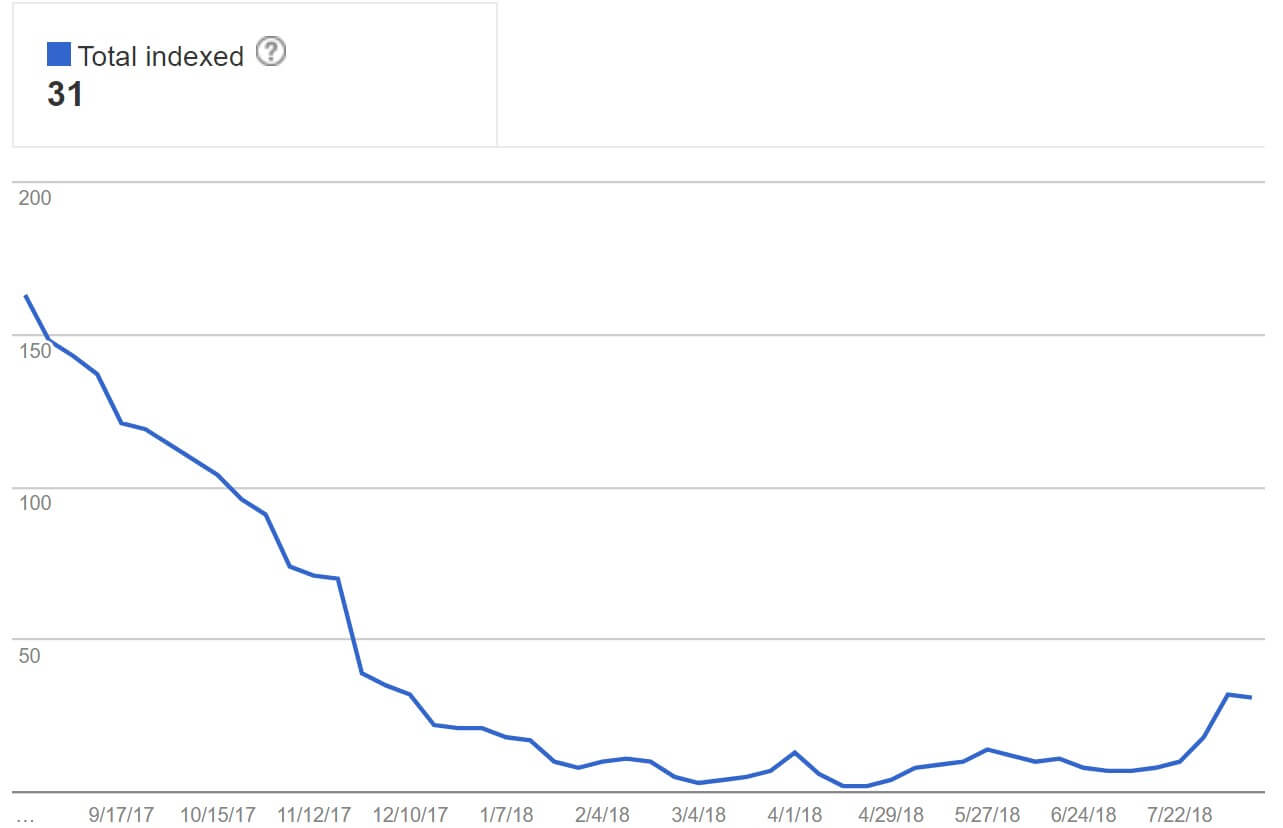
[youtube v=”BNHR6IQJGZs”]
Simple Google Search Console Tips for SEO Experts
Some additional Google Search Console tips to help you conduct an all-around analysis of your web resource are as follows.Internal Links – You Could Check
Internal links are crucial for your search rates. The more internal links leading to other pages your website has, the greater the chance that SERP will regard it as relevant. However, use links wisely, especially in a blog. For blog-like types of resources, SERP often lists primarily old pages (because most internal links lead to them).Outbound Links – Google Start Show More & Fresh Links
Did you know that Google can fine you for using links to third-party resources in your web resource (e.g., for advertising purposes or a reference to an integral source)? This fee is issued for “unnatural outbound links.” Watch a very useful video about this type of link:[youtube v=”3mdMXdQ_VyU”]
To avoid this, follow these rules:- Don’t link to ambiguous or dark resources;
- Exclude nofollow links;
- Check every link you use on your site (it must be operational and refer to the anchor text);
- Try to post as few ad links as possible (especially when the advertised content topic doesn’t correspond with your resource topic).
Keywords in Google Analytics
To effectively choose keywords and key phrases, you’ll need a sufficient level of SEO expertise. However, uncommon requests are the most rated (one to two words like ‘mattress’, ‘buy mattress’) and opposed to narrow-focused ones (like ‘orthopedic mattresses <brand name> buy in Riga’). Google bots prioritize sites that will get into search results through such requests. Properly formulated key phrases might affect your rates in the following ways:| Keywords with brand names in them | Common requests |
| High CTR | Low CTR |
| Low CPC | High CPC |
| High conversion rates | Low conversion rates |
Check Your Brand Traffic
Famous online marketer George Michie insisted, on multiple occasions, that branded and non-branded traffic provide completely different strategies for winning over customers. In 2014, there appeared to be a new advanced tool in the list of benefits of Google Search Console. There appeared to be a feature for segmenting branded traffic from general traffic. If your website promotes a certain brand, you will want to know how a user found their way to your resource. They could have clicked on a brand name, or they could have been interested in a particular category of products. Let’s consider a particular case. For Armani’s marketers to organize the most efficient ad campaign possible, they must know which search requests people use to reach their brand – ‘Armani dresses’, or something more abstract like ‘fashion dresses 2019’. The results of the metrics for both key phrases would vary dramatically, so it is best to inspect them separately, too. Usually, CTR is boosted with high click rates on simple keywords.Find Your Traffic Without Brand Keywords
For the sake of user privacy, Google, unfortunately, has to encrypt around 80% of organic keywords data. I.e., you won’t be really able to use them to optimize your website promotion strategy. Nevertheless, Google Search Console provides access to the remaining 20%, which would be quite enough to come up with an extensively efficient SEO method. Particularly, we’d recommend looking at the ‘Queries’ section in Google Analytics to find out how many views and clicks your resource gets and by which key requests. You can highlight the non-branded traffic by launching an extended filter and deleting branded traffic readings from the report there. Note that the analytics history only stores 90 days (the data gets to the Google Search Console with a 48-hour delay). Take our advice, and save the most promising keyword options in a separate document.Change Country
The Google Search Console can demonstrate countries in which the resource has the most popularity. The thing is, according to the country of a Google user, search results can deliver them pages relevant in the certain territory of the world. This can be especially helpful to owners of websites with higher-level domains, such as .com or .org. In such cases, you can set up the most relevant for your further development territories personally. If you are using the domain attached to a certain country, geolocation will be assigned to you by default. You’ll be able to customize this parameter only in the international targeting tab.Google Search Console Tricks: Conclusion
As you can see, Google search console optimization is a voluminous but not so difficult piece of work. Particularly, it would be very useful to involve one of the most advanced tools for SEO specialists – Google Search Console (combined with our Google search console tricks). Spend some time and learn to work with it and you’ll see astonishing results. Alternatively, if you don’t have time to do all that personally, employ qualified experts!
You may also be interested in


