
The updated Travelpayouts referral program has been live since April 2026. We’ve watched how it performs for different types of partners, collected honest takes from bloggers who’ve been testing it, and put together this little report for you – what works, what doesn’t, and where to start.
If your referral link is still sitting unused in your dashboard, this is worth a few minutes of your time.
Quick recap: how the referral program works
Skip this if you already know the terms – or reread it to see exactly what it takes to earn up to $600. (By the way, this is a permanent program, not a limited-time offer.)
Basically, you share your link with another creator. Once they join Travelpayouts and start making money, you both get rewarded. Their earnings don’t come out of yours – Travelpayouts pays the bonuses itself.
Here’s the reward schedule.
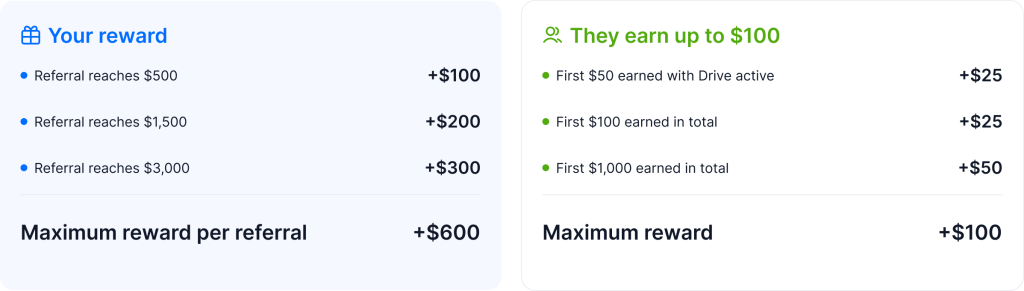
A few things worth knowing:
- Only confirmed bookings count toward milestones – cancelled or processing ones don’t.
- There are no deadlines, so referrals can reach milestones at their own pace.
- There’s no limit on how many partners you can invite.
Does this work for B2C blogs?
The most common reason partners skip the referral program: “my audience is travelers, not bloggers.” It’s a fair concern, but worth thinking through.
Bloggers follow each other for inspiration, for workflow insight, for the “how does she do this?” factor. Some of your readers are themselves building their blogs, channels, or newsletters – and they’re paying attention to how you operate.
When you write about monetization or mention the tools behind your content, the referral link fits naturally into that conversation. You’re sharing something genuinely useful with the part of your audience that’s already curious about the creator side of things.
Referrals work best when they’re integrated into content you’re already making, not a separate campaign. And your audience probably already suspects you’re monetizing your content anyway. Sharing your referral link is a chance to be more open about it, and to genuinely help them do the same.
Who to invite
If you know someone who fits the description below, it’s worth mentioning the program to them – not as a pitch, just as a recommendation.
Good candidates:
- Travel creators with active sites and regular traffic: destination bloggers, travel photographers, digital nomad bloggers, travel vloggers, newsletter authors, or anyone publishing useful travel content consistently
- Creators who are already thinking about monetization and looking for tools to earn from their content
Probably not the right fit:
- Someone with no audience, platform, or travel project yet
- People looking for quick money rather than a real way to monetize their content
- Anyone who wants to sign up only for the bonus but has no plan to create, grow, or monetize a travel project
You can share your link anywhere, but random signups rarely reach milestones, and spreading it wide gets time-consuming fast. Remember: the people most likely to convert are often the ones you’re already talking to.

Know a travel creator? Earn up to $600 for each one
Where to share your referral link
The short answer: wherever you already create content and have an engaged audience.
Your blog
The highest-converting placements are inside posts you’re already writing about affiliate marketing, monetization, or your workflow – “how I make money from my travel blog,” “tools I use to monetize my content.” Readers who open that content are exactly the right audience.
For example, Adventures from Elle published a post about how Travelpayouts and Drive helped monetize older blog posts that already had traffic. It worked because the recommendation was part of a real creator story, not a random promo block.
A dedicated Resources page is another strong option. It’s low-effort to set up, and people looking for recommendations will find it there on their own.
Email newsletters
Email tends to outperform social for referrals because the audience is already opted in and trusts you. A few placements that work:
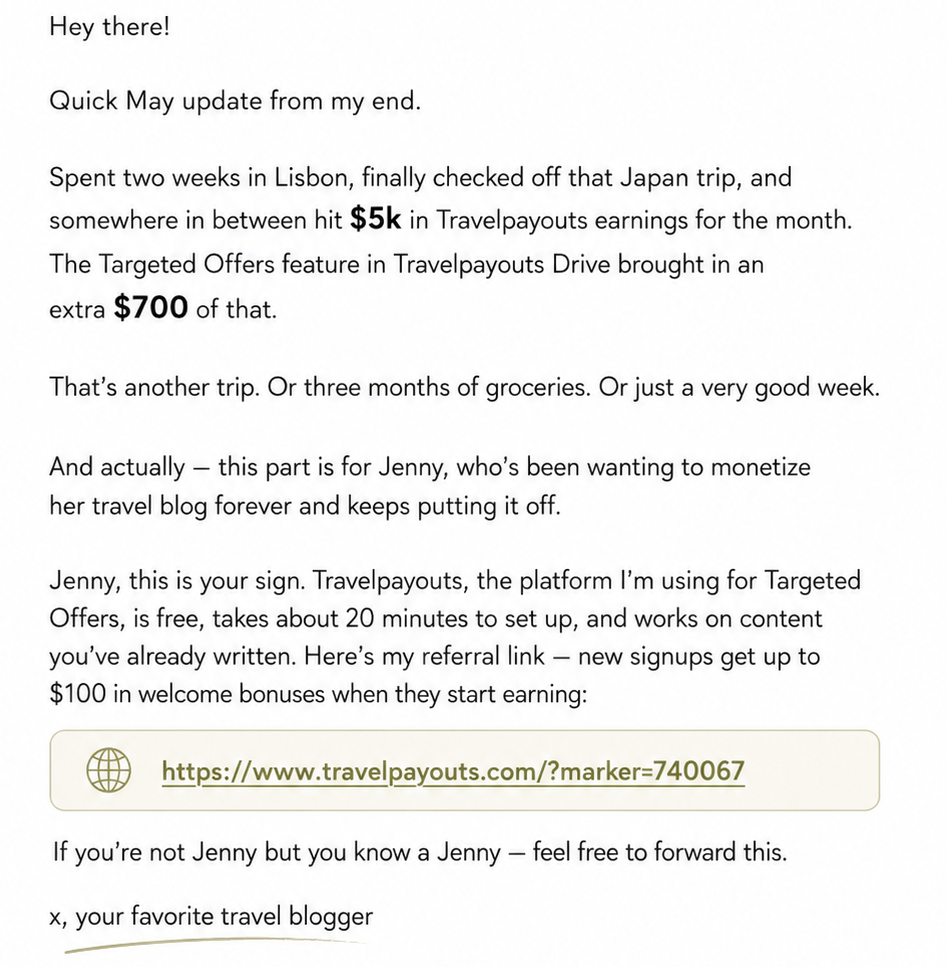
- A P.S. at the end of a regular send
- A standalone email about your affiliate setup, with the referral link as the CTA
- A short mention inside a tools or resources roundup
Instagram and socials
DMs are surprisingly effective. When someone comments asking how you monetize or what tools you use, a direct reply with context and your link converts much better than a public post. It’s personal, and they’ve already signaled interest.
Stories and close-friends lists work well for a soft, low-pressure mention. Adding the link to your bio gives it passive visibility without any active effort.
A Reel or carousel walking through your affiliate workflow, with a CTA to sign up at the end, takes more effort but performs well with an engaged following. Some partners use ManyChat to automatically send their referral links when someone comments a keyword. (Basically, this scales the DM approach without extra manual work.)
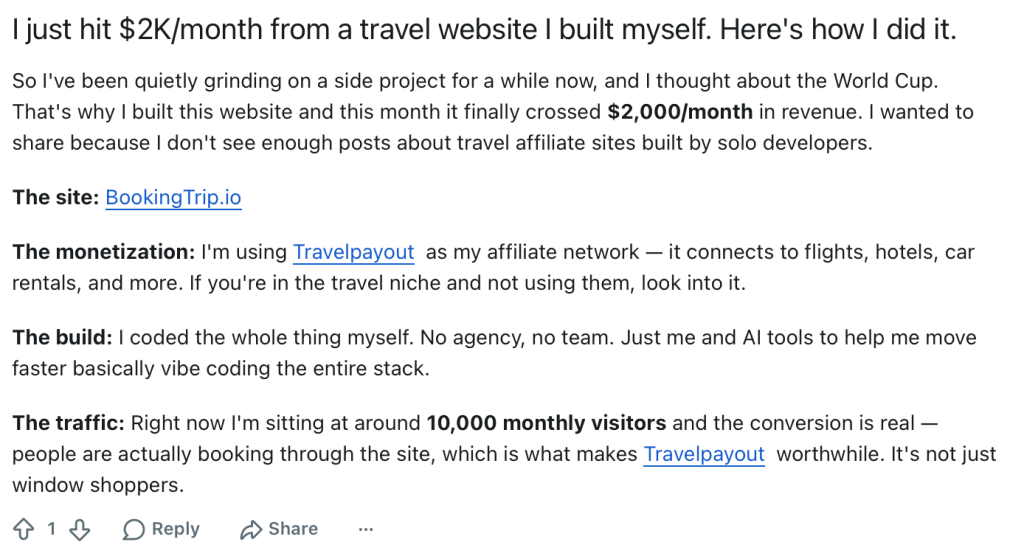
Build-in-public posts are another strong format, especially for SEO specialists, niche site owners, or creators building travel projects. These posts work best when the referral link is part of a real story: what you built, how much traffic it gets, how it earns, and which tools you use.
YouTube
If you make videos about travel blogging or monetization, a mention in the description and a verbal callout in the video are both natural fits. You can also turn your referral link into a QR code to make it easy for viewers to scan from their phones.
How to pitch your referral link
The $100 welcome bonus is a nice hook, but it shouldn’t be the whole pitch.
The better angle is the actual value of the Travelpayouts platform: free tools like Drive that automate monetization, access to 80+ travel brands through one dashboard, steady passive income from existing content. The bonus is a reward for getting started, not the reason to get started.
Framing it as “here’s how I earn from my travel content, and here’s how you can too – plus there’s a welcome bonus when you sign up through my link” is much more compelling than “sign up and get $100.”
It also sets better expectations. Rewards unlock as referrals actually earn, not instantly after signup. Be upfront that this is a long-term income stream. Someone who signs up and goes quiet won’t reach any milestones, and you won’t earn any bonuses.
What not to do
A few patterns that consistently backfire:
Dropping your link in random chats, forums, or Facebook groups with no context.
It reads as spam, the people who click aren’t the right fit, and platforms like Facebook and Reddit are quick to flag accounts for sharing unsolicited affiliate links.
Promising quick money.
The program rewards real effort and real earnings. Someone expecting a fast payout will be disappointed, and you’ll have wasted a referral on someone who never reaches a milestone.
The “Powered by Travelpayouts” tool you might be missing
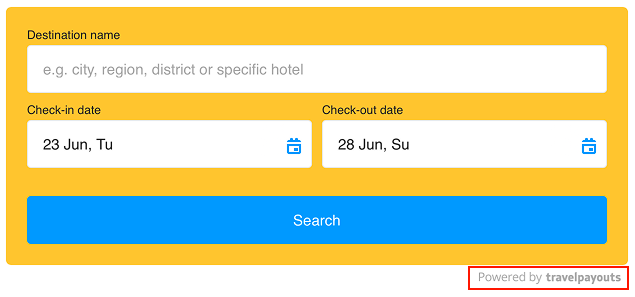
If you use Travelpayouts widgets on your site, you can add a “Powered by Travelpayouts” link to each one. Then, when another blogger sees your widget and clicks it, they’ll land on Travelpayouts with your referral ID already attached. This is a completely passive referral channel – all you have to do is make sure the setting is enabled when you create your widgets.
To turn it on, go to: Widgets → Customize and copy → Add my referral link.
(Almost) ready-to-use copy
Not sure how to introduce your referral link? Here are a few options to copy and adapt.
For a blog post or resources page:
Managing multiple dashboards, payment thresholds, and affiliate programs for my travel site used to take hours. Now everything’s in one place on Travelpayouts. This is the travel site monetization shortcut I wish I’d found earlier! New signups get up to $100 in bonuses. [your link]
As you know, I don’t write ‘buy this’ content, I write about travel. But Travelpayouts automatically turns the links I’m already including into affiliate rewards. If you have a travel site and aren’t using Travelpayouts yet, here’s my referral link. New signups get up to $100 in bonuses! [your link]
For a newsletter:
P.S. I’ve gotten some emails from readers asking how my site stays fast with all the booking widgets. The answer is Travelpayouts. Their widgets are lightweight enough that I haven’t noticed any impact on load speed, and they handle all the affiliate tracking automatically. Here’s my referral link if you want to try it: [your link]
Quick note before I go. I know this sounds like a sponsored mention, but it isn’t. I found a platform that automatically updates affiliate links across my entire site, including old posts, for free. It’s called Travelpayouts, and it gave me back a few hours a week I didn’t know I was losing. Here’s my link if you’re losing time the same way: [your link]
For a DM reply:
Hey! I was tempted to keep this one to myself, but honestly, it’s too good not to share. I earn affiliate commissions through Travelpayouts. It’s free, and the setup was straightforward enough that I didn’t have to spend days figuring out a new platform. Here’s my referral link – there’s a welcome bonus in it for you if you have a travel site: [your link]
You might have heard of Travelpayouts. I wish I’d heard of it earlier! I used to spend way too long managing separate travel affiliate programs. Now, with Travelpayouts, everything lives in one place, so no more jumping between a million tabs. Here’s my link – there’s even a cash bonus for new signups with a travel site: [your link]. Hope you’re finding this earlier in your travel blogging journey than I did.
For a Story or caption:
Tiny blogging win: I finally found a way to spend less time on my affiliate tasks. Travelpayouts keeps travel brands, links, tools, and payouts in one place, so monetization doesn’t feel like a separate job anymore. Link in bio if you’re building a travel site too.
Not gatekeeping this because I hate spreadsheets: my travel monetization stats used to live across ten tabs, three spreadsheets, and a bunch of ‘I’ll organize this later’ notes. Then I found Travelpayouts. Now I can see earnings, bookings, programs, and stats for all my projects in one dashboard. Link in bio if you’re building a travel site too.

FAQ
Do my referrals need a website?
No, any creator can join. The $25 bonus for activating Drive is only available for referrals with sites, but all other milestone rewards apply regardless of platform.Earn up to $600 per referral — here’s where and how to share your Travelpayouts link so it actually converts.
When do I actually get paid?
After your referral reaches the milestone and successfully withdraws their earnings – both conditions need to be met. You can track your referrals’ progress anonymously in the Referral program tab of your dashboard, so you always know where things stand.
Can I refer more than one person?
Absolutely! Your link works for as many referrals as you want, with no cap on total earnings.
What if my referral signs up but never earns anything?
You don’t receive a reward until they hit a milestone. There’s no penalty, they just stay at zero in your referral stats.
Can I create a second account and refer myself?
No. Self-referrals are prohibited and will result in removal from the program without payment.