


Can you post affiliate links on Pinterest?
Yes, you can post affiliate links on Pinterest. The platform doesn’t prohibit it, as long as your pins are useful and follow the rules. This means your pins should link to a relevant page. Plus, you need to clearly explain that it’s promotional – provide an affiliate disclosure.
Although Pinterest rules allow affiliate links, your program’s rules might limit it. Some brands don’t allow direct linking, while others might prevent you from using the platform as a traffic source. Before starting with Pinterest affiliate marketing, check your program’s conditions.
How to add affiliate links to Pinterest: step-by-step
Now, let’s walk through the process. Follow our guide below to learn how to add affiliate links to Pinterest.
Step 1: Create a relevant pin
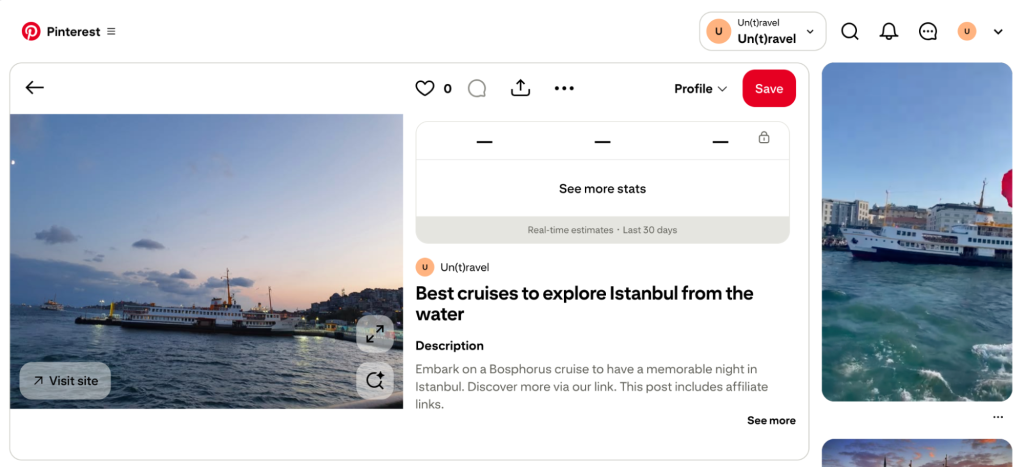
First, create a new pin or find an existing one that matches the affiliate product you’re going to promote. For example, if you’re in the travel affiliate niche, you can use a photo from a cruise to promote a platform for booking them.

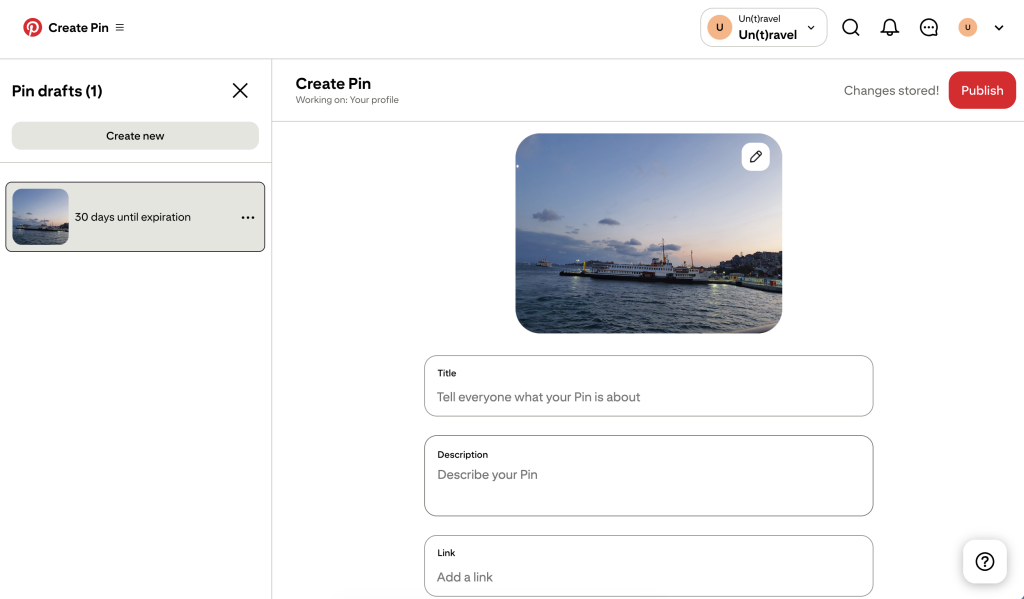
Step 2: Add your affiliate link
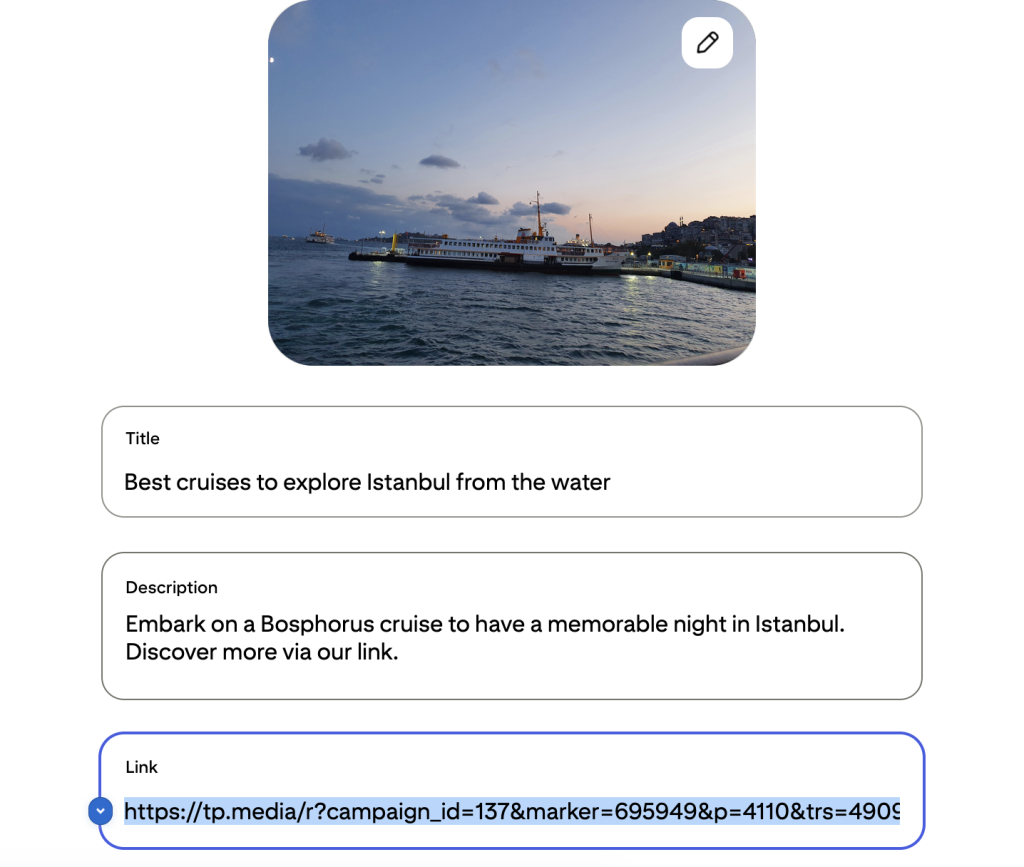
Give your pin a title and description. Then, add your affiliate link to the Link field.
If you’re sending your audience to a product page directly, paste your full tracking link. Don’t use a link shortener, since Pinterest may flag your content as spam.

Beyond adding a link, you can also tag affiliate products in a dedicated field. It can work especially well for affiliate programs like Amazon Associates, but others might restrict it.
If you’re a travel content creator and work with more than one affiliate program, link management can be difficult. If you join Travelpayouts, you’ll get access to over 90 brands and user-friendly tools to create and track your links in one place.
Join the Travelpayouts partnership platform
Join todaybrands
Step 3: Add an affiliate disclosure
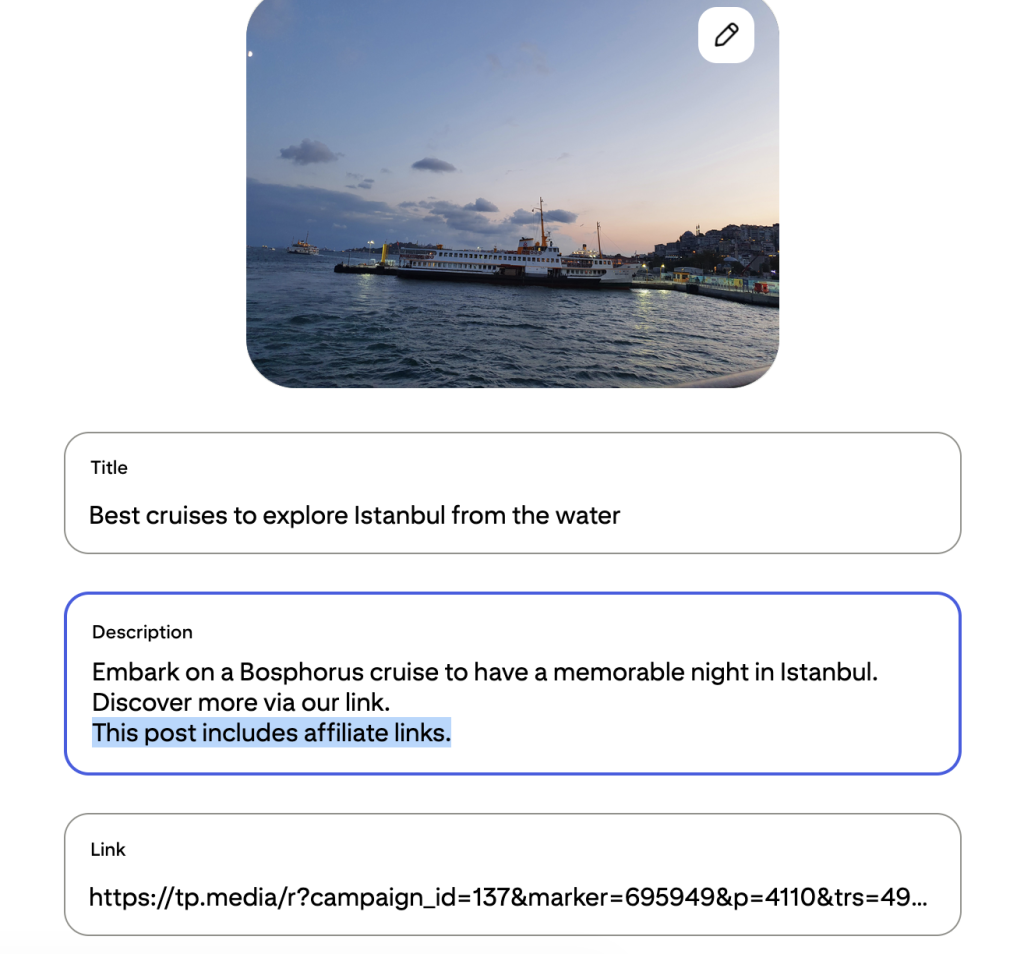
Pinterest rules and FTC guidelines require you to specify the commercial nature of your content. This means that if you’re linking directly to a product page, you need to add an affiliate disclosure to the pin description. This can be a simple hashtag, like #affiliate and #ad, or a simple sentence, like “This post includes affiliate links.”
The user needs to clearly understand that they’ll see an affiliate offer following your pin’s destination link. Be transparent and avoid vague language, like “brand collaboration” or “partner post.”

But what if you’re not using direct links and instead lead users to your blog or website? In that case, you technically don’t have to add an affiliate disclosure because it’s already on your website. However, you can earn your audience’s trust by being as transparent as possible. It’s best to add a disclosure to your pin and also before the first affiliate link on the destination page.
Step 4: Check the destination page
Before you hit the post, double-check your work. Paste your affiliate link into your browser and make sure that it:
- Works.
- Leads to the product page you need.
- Matches the pin’s contents.
- Doesn’t use misleading redirects that send people somewhere unexpected.
Step 5: Publish and test the pin
Once you’ve verified everything, publish your pin. Once it’s live, verify that the pin contents are displayed correctly and click on the link to check that it leads to the right page. Test on both mobile and desktop versions of the platform.

Direct affiliate links vs. linking to your website
Your Pinterest pins can either link directly to products or lead to your blog or landing page. Both are valid promotion methods, each with its own advantages and drawbacks.
| Method | Best for | Pros | Cons |
| Direct affiliate links | One-off promotion, shoppable product tagging, showcasing one product | – No website needed – Quick – Fewer clicks before purchase | – Higher risk of account block and triggering spam filters – Potentially lower conversions – Can’t collect emails and personal information |
| Linking to your website or landing page | Creating and maintaining your personal brand, promoting several product options | – Allows you to build an audience – Customers get more context about the products – Higher potential conversions for complex or high-ticket products – Less risk of account bans or spam triggers | – Requires content creation – Longer path to conversion |
The options you choose ultimately depend on your affiliate marketing strategy. Direct links will suit you better if you’re focusing on quick promotions and don’t want to monetize your content and audience relationship long-term. Linking to a landing page gives you more options. You can build a multi-channel affiliate marketing funnel, support a brand, and nurture your relationship with the audience.


Bri from Bucketlist Bri and the Nomad in Japan blogs, the founder of the Bootstrap Blogging course and community
Bri highlights that Pinterest content can be a great long-term investment, bringing traffic to your blog (and so other affiliate or digital products you advertise) for years to come:
Pinterest is the most underrated platform in travel blogging and I want to make that case clearly: it drives thousands of clicks to my blog every month, consistently, without requiring daily maintenance. It’s a slow-burn platform, not a follower-growth platform – and that’s exactly why most creators ignore it. They’re chasing the shiny scroll of Instagram.
Pinterest affiliate link rules to follow
To sum it up, here are all the rules you should follow to promote affiliate links on Pinterest:
- Use relevant links that match your pin’s contents.
- Disclose affiliate links.
- Use affiliate links in moderation, and avoid creating repetitive pins or posting large volumes of pins.
- Don’t publish misleading pins that hide their commercial nature or otherwise confuse users.
- Follow Pinterest’s Commercial and Branded Content Guidelines and Community Guidelines and stay up to date in case they change.
- Follow your affiliate network or brand partner guidelines on traffic sources and direct linking.
- Don’t promote products from prohibited categories, such as tobacco, medical treatments, and others.
Common mistakes when posting affiliate links on Pinterest
Pinterest can be a great platform to start affiliate marketing with no money. However, beginner mistakes can slow down your progress. Avoid doing these when posting affiliate links to get results faster:
- Ignoring affiliate program rules. If you use direct linking when the brand prohibits it, you won’t get a commission. Thoroughly read the program conditions and follow them.
- Publishing low-quality pins. Your pins should bring value to the platform users on their own. Use original and high-quality visuals to attract attention and avoid triggering spam filters.
- Adding irrelevant links. When a user clicks on your pin, they should get to relevant content or a blog page. Otherwise, you mislead your customers and violate Pinterest’s spam rules.
- Using broken links. Check that your links are up to date and lead to live, accessible pages.
- Using link shorteners. Pinterest may flag shortened links as spam, so paste your full affiliate links instead.
- Posting too many repetitive affiliate pins. Pinterest algorithms may treat repeated, near-identical pins as spam, and your account might get suspended. To avoid that, use a unique design each time.
- Omitting affiliate disclosures. This directly violates platform rules and FTC guidelines, so make sure you add disclosures when you use direct affiliate links.
FAQ
Do you need a website to post affiliate links on Pinterest?
No, you don’t need a website to post affiliate links on Pinterest. You can either link to products directly or to a landing page.
Can beginners post affiliate links on Pinterest?
Yes, affiliate marketing beginners can use Pinterest to promote products or services. The platform is free and easy to navigate. Plus, you can use direct product links or link to your blog, website, or landing page.
Where do you put an affiliate link on Pinterest?
You can put your affiliate link in the Link field when creating or editing a Pinterest pin. You can also tag products. In this case, the merchant will get a notification and must approve your tag before users can see it.
Can you reuse the same affiliate link in multiple pins?
Yes, you can use the same affiliate link for multiple pins. However, each pin needs to be unique and provide value. Pinning the same content repeatedly violates Pinterest guidelines and can trigger spam filters.
Can you use link shorteners for affiliate links on Pinterest?
No, you shouldn’t use link shorteners for affiliate links on Pinterest. Although some shorteners are permitted, it’s best not to risk it. Always paste your full affiliate links to avoid triggering spam filters or an account block.
Can you post Amazon affiliate links on Pinterest?
Yes, you can post Amazon affiliate links on Pinterest, and you can also use the tagging feature to promote products. However, make sure to check Amazon Associates requirements for your region before publication.