Affiliate marketing with Facebook ads means buying traffic from Meta to promote an affiliate offer on the platform. You create a paid ad, link to your landing page with affiliate links, and then earn a commission for a successful sale or another target action. You can set up Facebook ads in Meta Ads Manager.
As with other paid ad strategies, your success depends on the product you’re promoting, the ad itself, your landing page, and tracking. It also depends on how closely you follow Meta’s Advertising Standards.
TL;DR: Facebook ads for affiliate marketing
- You can use Facebook ads for affiliate marketing if the affiliate program allows it and the offer and your ad meet Meta’s guidelines.
- Before launching an ad, make sure the commission can cover the acquisition cost.
- Unlike linking directly to a product, a link to a landing page gives you more control over messaging and tracking.
- Use CAC or ROAS and your earnings to measure a campaign’s success, not just CTR and CPC.
- Only scale those ads that stay profitable after a budget increase.
Can you use Facebook ads for affiliate marketing?
Yes, using Facebook ads for affiliate marketing is possible. However, you need to check your affiliate program’s rules and make sure paid ads are included in the permitted channels. Even then, direct linking to an affiliate offer might be prohibited.
On Facebook’s side, your ad and landing page need to comply with Meta’s advertising policies.
How to use Facebook ads for affiliate marketing: step-by-step guide
Now, let’s explore what affiliate marketing using Facebook ads looks like in practice.
Step 1: Choose the right affiliate offer
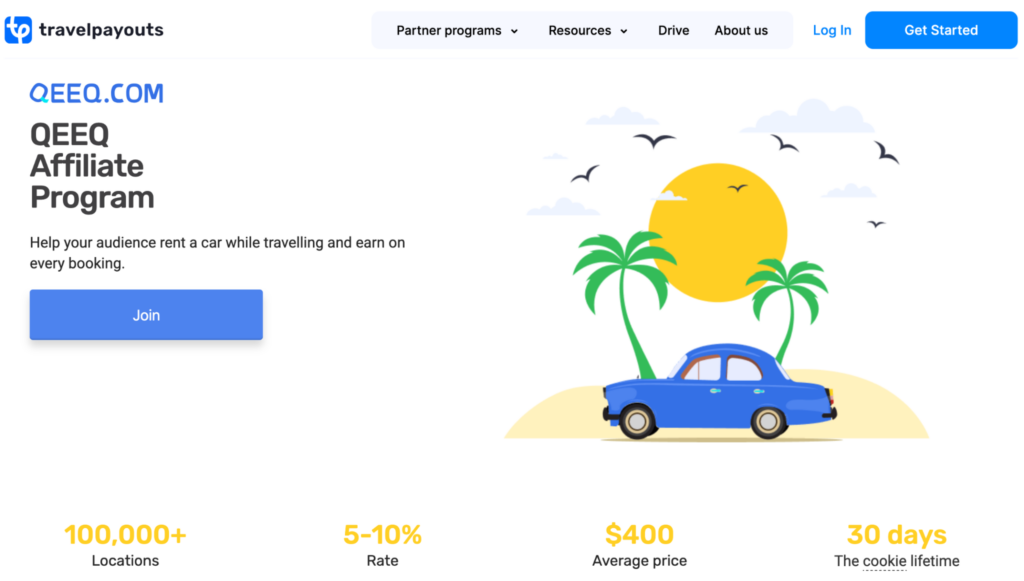
First, study the rules of the affiliate programs you’re considering. Before moving forward, verify that your chosen program allows paid traffic and paid ads on Meta platforms.
If you’re a travel blogger, you can access 90+ programs through the Travelpayouts Partnership Platform. From popular accommodation and tour brands to eSIM and outdoor brands, you can see your programs in one dashboard. Plus, get access to AI-powered monetization tools and analytics to optimize your results.
Join the Travelpayouts partnership platform
Join todaybrands
If you can use Meta ads for promotion, note the commission amount, target countries, and target actions. Also check other advertiser limitations, such as using the brand’s name and logo and your own promo materials.
Most importantly, consider whether your potential commission will be higher than what you’ll pay for attracting customers. In other words, make sure that CAC (customer acquisition cost) is lower than your expected revenue. It can be easier to achieve with high-ticket affiliate programs.
Here’s how you can estimate whether running paid ads will be profitable, using the QEEQ program as an example:
- Identify your average commission. Taking QEEQ’s lowest commission and the average price, let’s assume it’s $20 per booking.
- Calculate your expected CAC. You’ll need two numbers: CPC (cost-per-click) and CR (conversion rate), which here means the share of ad clicks that end in a booking. If you’ve run ads before or have access to other data, use that. If not, start with benchmarks. According to WordStream’s Facebook ads benchmarks, the median CPC for Traffic campaigns in the travel industry is $0.42. Ad benchmarks can’t tell you the CR, because the booking happens on the brand’s website, not on Facebook. The user first lands on your page, then clicks your affiliate link, and only then books. Let’s assume 20% of your visitors click through to QEEQ, and 3% of them rent a car. That gives a CR of 0.6% (20% × 3%). Expected CAC is CPC divided by CR, so $0.42 divided by 0.6% makes it $70.
- Compare your expected CAC per sale to your expected commission per sale. In our example, the $20 expected commission is smaller than the $70 CAC. It means running a Leads-focused ad campaign for QEEQ, based on very rough estimates, won’t be profitable.
Step 2: Set up your Meta Ads campaign
Once you’ve decided which affiliate offer to promote, set up your campaign. Go to Meta Ads Manager from the Facebook menu or access its website directly.
Choose your campaign’s buying type – either an auction or reservation. The first type is more efficient and flexible, but the results are less predictable. The reservation type has more predictable performance goals and lets affiliate marketers plan and buy the campaigns in advance. We recommend starting with the auction type.
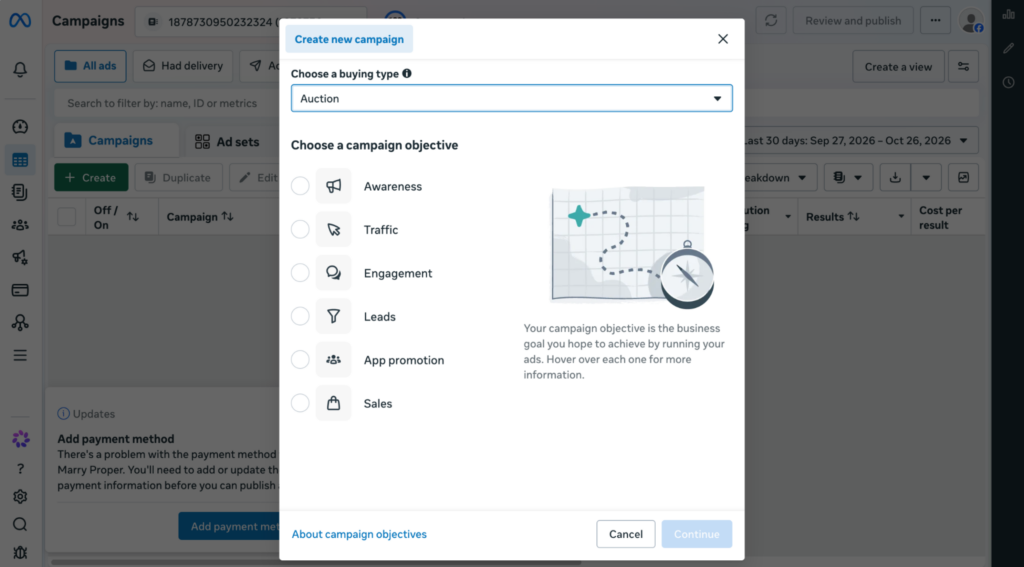
Here, you also need to choose your campaign’s objective. Pick Traffic for sending users to a landing page with the offer, or Leads if you’re capturing contact data and plan to promote a product or service via emails.
Next, choose the budget strategy. You can either set a daily spend or a lifetime budget. Note that the daily budget is an approximation, while the lifetime budget is a hard cap. For a sales campaign, a lifetime budget is more predictable and makes profitability easier to calculate.
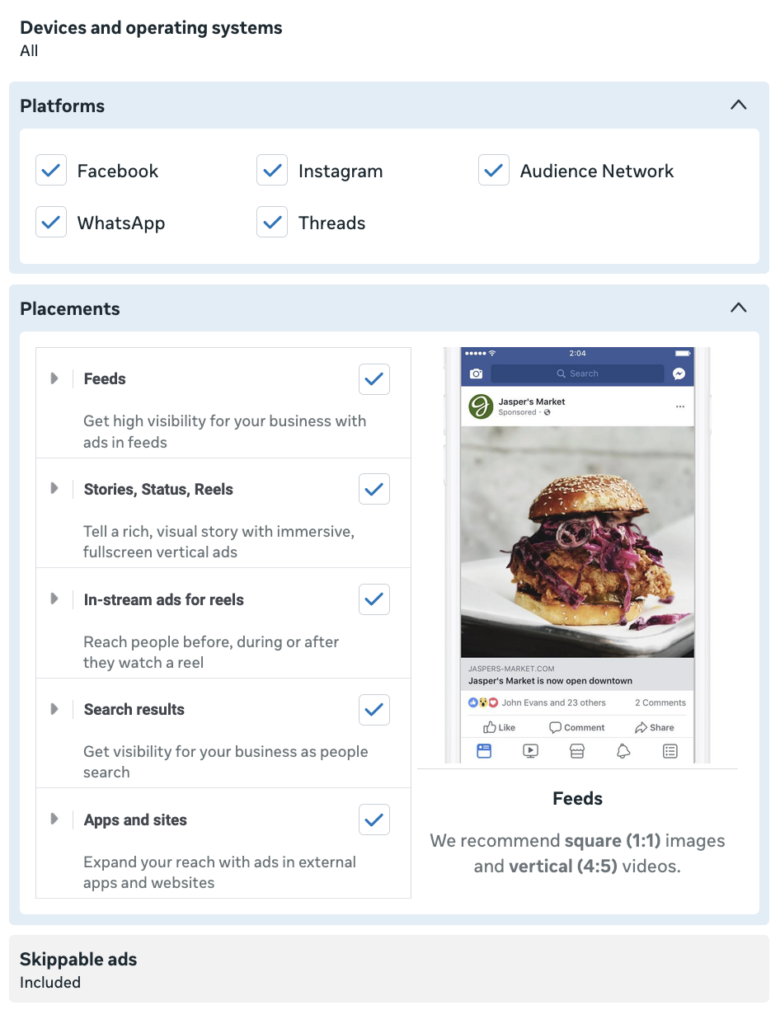
Finally, choose where users will see your ad. Here, you can pick precisely the platforms and placements. If you’re using Facebook ads alongside Instagram affiliate marketing, choose both.
Step 3: Choose your target audience
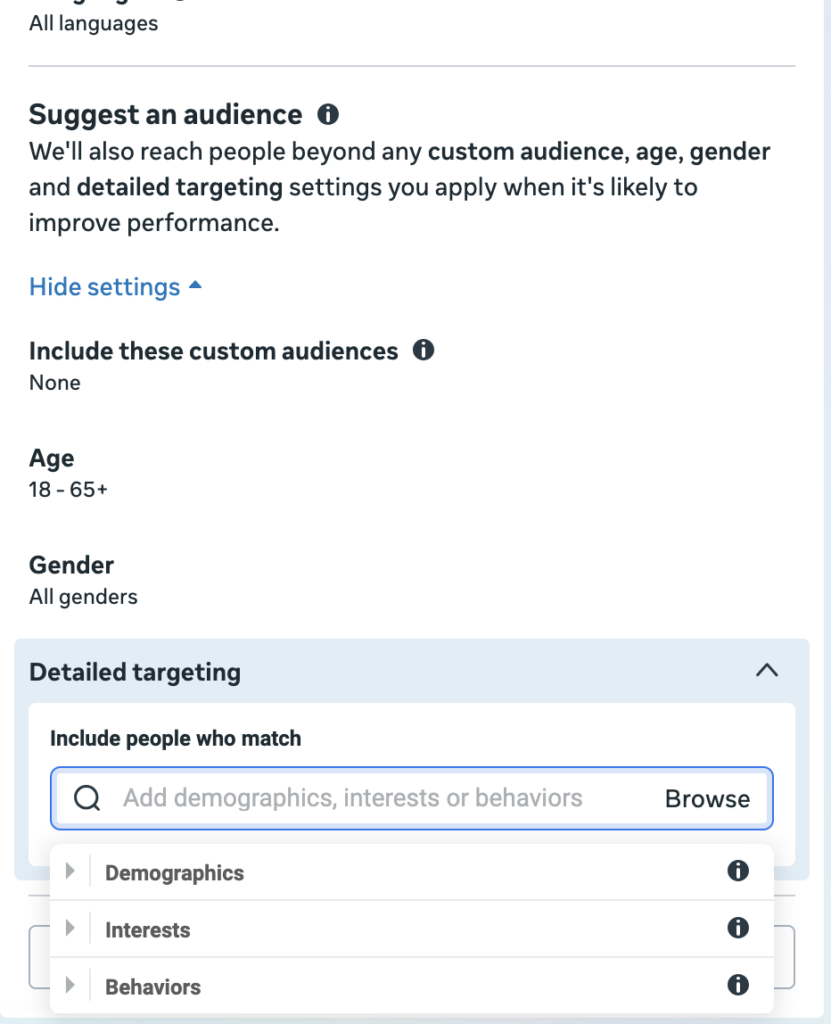
Specifying the target audience is one of the most important steps, especially on a limited budget. Inside the Meta Ads Manager, you can specify the geography, demographics, and interests of the customers you’re advertising to.
This depends on your affiliate marketing niche and the product you’re promoting. For example, QEEQ’s affiliate program targets customers worldwide, but you can narrow the audience by the platform’s languages: English, Chinese (simplified), French, etc. As this is a car rental service, you can target people interested in automobiles, car rentals, and adventure travel, as well as frequent travelers and frequent international travelers, based on behavior.
You can also use custom and lookalike audiences:
- A custom audience is built on your own data or Meta engagement data. It’s useful for retargeting and new customer campaigns. For example, you can target people who visited your website or interacted with your Facebook Page.
- A lookalike audience is built on your existing audience data and matches its characteristics. It’s useful to reach new people similar to your existing customers. To create a lookalike audience, you need a source with at least 100 people.
- If it’s still ranking, start with monetization. Broken or missing affiliate links are the most common reason revenue drops. Replace outdated offers with your current top-sellers for those destinations.
- If it’s not ranking, you may be competing in a too-crowded niche, or your SEO may be off. Review your keywords and E-E-A-T signals and see if the post has weaknesses.
💡 Tip: Remember to test different audience segments. Target one group of customers with one campaign and another group with your next one. You might assume the best strategy, but it’s better to verify it in practice.
Step 4: Create the ad
Once you’ve finished the technical setup, focus on the ad itself. Write a short headline focused on the benefit for the customer, add a few compelling lines for details, and end with a clear, value-driven call to action. For the format, create an image, a video, or a carousel, depending on what you’re promoting.
Some of the tips Meta offers to make ads more engaging include:
- Using vertical video format, which is more convenient for mobile screens.
- Keeping the ad copy short, as many users skim and want to understand your message as quickly as possible.
- Experimenting with different CTA buttons to see which are more effective.
Here’s an example of an ad linking to a travel blog article. The ad names the travelers’ needs and misconceptions, describes what the guide offers, and uses an eye-catching photo. Because this ad comes from the blogger’s account, the first-person point of view and direct appeals to the audience make it more personal and engaging.
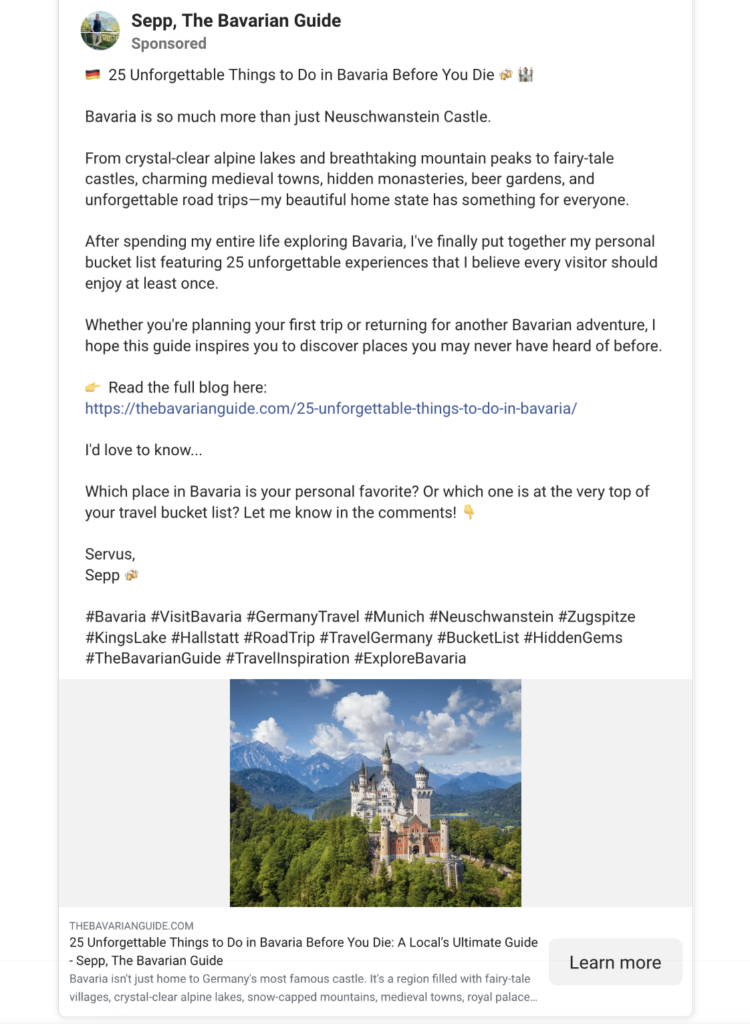
Most importantly, make sure your ad matches the offer. If you’re linking to a blog article, mention that in the text. If you’re linking to a product page, clearly communicate that, too.
Step 5: Use a relevant landing page
In general, the best way to promote affiliate links is via a landing page. This gives you more context to describe the offer and convince readers to make a purchase. Plus, it expands your choice of affiliate programs, as many prohibit direct linking.
Your page needs to match the ad. Keep the message and branding consistent so you don’t mislead viewers.
Apart from that, your landing page needs to be mobile-friendly. This means it resizes to fit the user’s device, with large enough fonts and buttons. Since many browse Facebook on their phones and on mobile internet, the page should load as fast as possible.
Browse our article with successful affiliate marketing website examples for inspiration.
Step 6: Set up tracking
Tracking is an essential part of a successful affiliate marketing strategy, no matter the channel. For your affiliate link, you can see the results on your affiliate platform. If you have separate campaigns for one affiliate offer, you can add UTM tags. These help you identify traffic and conversions specific to your Facebook ad campaign in Google Analytics or other platforms. To see the campaign-based information on your affiliate platform, add a subID if the program supports it.
You can also use Meta Pixel and Conversions API on your landing page to improve tracking. The Meta Pixel tracks customers’ browser-based actions on your page, like viewing a product, adding it to cart, etc. Conversions API supports the Meta Pixel and lets you collect data even if users have ad blockers on. Both tools only work if you have access to the page and server, so if you link directly to an affiliate offer, you won’t be able to access them.
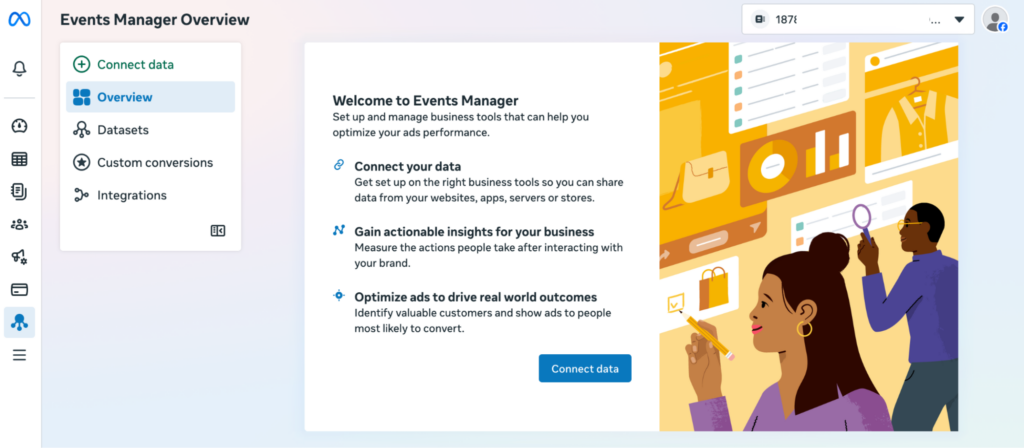
Sometimes, conversions are delayed or appear only in your affiliate platform, not in Meta Ads Manager. In that case, feed this data back to Meta so it can learn from these results and accurately evaluate your ad’s performance.
Step 7: Launch, test, and optimize
Once your ad campaign is ready, launch it. Make sure everything works as intended: the ad displays correctly, the landing page loads, every link opens, etc.
Track the metrics to see how well your campaign is performing. Pay special attention to these:
- CTR (click-through rate): what share of the ad impressions led to clicks.
- CPC (cost-per-click): how much one click costs.
- Conversion rate: what share of the page visitors made a purchase or completed another target action.
- CAC (customer acquisition cost): how much one conversion costs.
- ROAS (return on ad spend): how much you earned for every dollar spent on the ad.
- Affiliate revenue: your earnings from affiliate marketing.
Simply checking one metric won’t give you the whole picture. For example, cheap clicks don’t automatically mean your campaign is successful. If the users you attract don’t end up making a purchase, the low CPC doesn’t matter.
Check your results regularly and improve the campaign. You can rework the ad creative and review the affiliate marketing funnel as a whole. For example, if users visit your landing page but don’t follow through to the product, you might need to redesign it or rework your CTAs and copy.
Facebook (Meta) ads rules for affiliate marketers
Before going live, every Facebook ad gets reviewed against Meta’s Advertising Standards. Read the rules and follow them to make sure your campaign is accepted. The guidelines restrict promotion of alcohol, tobacco and related products, dating ads (without prior permission), and some other product categories. If you violate the Standards, Meta can disable your ad account and ads.
Other rules you should follow are:
- Your destination page should match the ad’s premise.
- There are no misleading claims, like guaranteed outcomes or exaggerations.
- Your ad clearly states what the destination link is.
- Your ad or landing page includes affiliate disclosures, per FTC guidance.
- Your ad follows the affiliate program’s rules.
- Your ad doesn’t have swearing, nudity, or suggestive images.
Though direct links to affiliate offers are technically not prohibited under Meta’s rules, your account might get restricted. So the safest approach for affiliate marketing with Facebook ads is to link to a bridge page before sending traffic to the product or service you’re promoting.
Common mistakes when using Facebook ads for affiliate marketing
If you’re just starting to use Facebook ads for affiliate marketing, you might overlook key parts of the strategy. You should both follow the rules and best practices we’ve outlined and avoid these mistakes:
- Not checking the program’s allowed traffic sources. Before you create an ad campaign to promote an affiliate offer, make sure the program allows paid traffic.
- Choosing the offer based solely on commission. If the product or service you promote is low quality or has a poor reputation, customers won’t buy it.
- Launching an ad campaign without tracking. Tracking helps you see your campaign’s real-time progress and improve it if it’s underperforming. You can also use your results as benchmarks, conduct experiments, and have more control over future campaigns.
- Targeting an audience that is too broad. Successful campaigns feel personal to customers, addressing their needs and compelling them to make a purchase. If you try to speak to everyone, your ad might appeal to no one.
- Not putting enough effort into the ad creative. Your ad competes with dozens, if not hundreds, of other ads, so if it’s not distinct, your customers will scroll past it.
- Not matching the ad and the landing page. The landing page should deliver on the promises your ad makes. Otherwise, it’s misleading to the customers.
- Evaluating the ad’s performance based only on CTR or CPC. Successful ads are more than cheap traffic, so you also need to consider ROAS, CAC, and revenue.
- Scaling an underperforming campaign. Increase the budget only for ads that show good results, and stop or deprioritize campaigns that aren’t delivering clicks and commissions.
FAQ
Can you use affiliate links directly in Facebook ads?
Technically, you may be able to use direct affiliate links in Facebook ads, but you usually shouldn’t. Direct linking to an affiliate page may lead to account bans, so link to your website and landing page instead.
Do you need a landing page for Facebook affiliate marketing?
Yes, to use Facebook successfully for affiliate marketing, having a landing page or website is considered best practice. This helps you avoid potential bans, nurture your audience, and track behavior to improve your strategy.
How much should you spend on Facebook ads for affiliate marketing?
When you’re creating your campaign, Facebook recommends starting with at least $20 per day or an overall (lifetime) budget of $350 per campaign.
How do you track affiliate sales from Facebook ads?
You can track affiliate sales from Facebook ads with Meta Pixel and Conversions API installed on your landing page. You can also use UTM tags to see your campaign’s performance on Google Analytics or similar platforms.
When should you scale a Facebook affiliate campaign?
You should scale your Facebook affiliate campaign when your tracking is reliable, the ad has accumulated enough conversions or clicks for Meta Ads Manager to optimize it as much as possible, and ROAS and CAC stay consistent over 3 or more days.
Final thoughts
Facebook ads for affiliate marketing are a data-driven strategy that lets you target specific customer groups and see results faster. Used well, ads can be both a profitable promotion channel and a way to attract an audience to your blog that you can nurture.
If you want to promote travel affiliate products, join Travelpayouts. With easy link management, smart monetization tools, and a unified analytics dashboard, you can focus on the creative part of your work instead of routine tasks.
Join the Travelpayouts partnership platform
Join todaybrands